
Your plan isn't active
What happens when a payment fails or a plan is cancelled, why paid features lock and taps go missing, and how to reactivate your plan to get everything back.
If a payment fails or a paid plan ends, your brewery falls back to the Free plan's features until the plan is active again. Your beers, taps, layouts and settings stay where they are.
How you can tell
- The admin Dashboard shows Reactivate your plan: "Your subscription isn't active, so your premium features are paused." with a Renew now button.
- On your account page, the brewery's plan shows its status, such as Past Due, Payment Failed, Suspended, Paused, Incomplete or Cancelled.
- Paid items in the admin sidebar show a Pro or Basic+ badge and open Upgrade to Unlock when you click them.
What stops working
While the plan isn't active, the brewery has Free plan features:
- Fewer taps for customers. Your public taplist shows only the first 3 taps, counted from tap 1. Signed in, you still see them all. See Some taps or beers are missing.
- Locked pages. The Display Editor, Menu Builder, Embed, Team and API Keys need Basic or Professional. Analytics needs Professional. Opening one of these pages takes you back to the Dashboard.
- Your website embed shows "Embed feature requires a paid subscription. Upgrade at raspberrypints.com/pricing" instead of your taps.
- Partner API requests are refused with 403 and the code
LICENSE_REQUIRED. - Beer pages show Beer not found, and email alerts and Professional's real-time updates stop.
- Extra themes and the Basic plan's other features are locked.
Everything comes back when the plan is active again. Nothing you set up is deleted.
Reactivate your plan
Open My Account
Go to your account page and sign in as the brewery's Owner. Or click Renew now on the admin Dashboard.
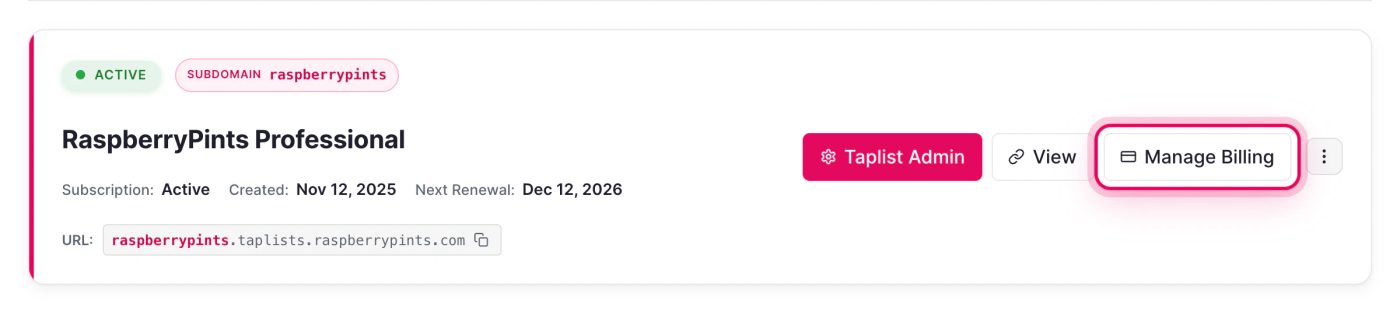
Click Manage Billing on the brewery
It opens the secure billing portal.
Update your card or renew the plan
If a payment failed, update the card. If the plan was cancelled, choose a plan again.
When the plan is active, paid features return. Reload the admin if it still shows the old status. See Manage billing and change plans.
"We couldn't check your plan just now."
This message means the admin couldn't reach our servers to check your plan. It doesn't mean your plan has changed. Click Try Again. If it keeps appearing, check your connection, then email support@raspberrypints.com.
On the Free plan already?
If you've never had a paid plan, these features aren't part of your plan yet. Compare the plans in Plans compared, and see Buy a plan.
Was this article helpful?